SuperEditText使用说明 控件地址:https://github.com/pvphero/SuperEditText
1.控件的功能
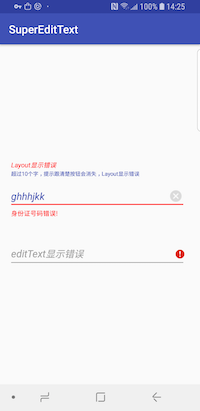
EditText一键清除功能
TextInputEditText下方提示语可以显示隐藏
清除按钮可以显示隐藏
EditText 错误提示
Layout错误提示
失去焦点时,提示的文字消失;获得焦点时,提示的文字显示
2.控件用法说明
1 2 3 4 5 6 7 8 9 10 11 12 13 14 15 16 17 18 19 20 21 22 23 <com.vv.superedittextlib.FloatingEditTextLayout android:id ="@+id/edittext_layout_error" android:layout_width ="match_parent" android:layout_height ="wrap_content" android:layout_margin ="16dp" android:hint ="Layout显示错误" android:imeOptions ="actionDone" android:inputType ="textCapWords|textEmailAddress" android:maxLength ="100" android:maxLines ="2" android:paddingRight ="10dp" android:textAllCaps ="true" android:textColor ="?colorPrimary" android:textSize ="18sp" android:textStyle ="italic" app:hintAnimationEnabled ="true" app:hintTextAppearance ="@style/HintTextAppearance" app:suet_clearButton ="true" app:suet_floatingLabelText ="超过10个字,提示跟清楚按钮会消失,Layout显示错误" app:suet_floatingLabelTextColor ="?colorPrimary" app:suet_isSafeInputText ="true" > </com.vv.superedittextlib.FloatingEditTextLayout >
1
2
3
4
5
6
7
8
9
10
11
12
13
14
15
16
17
18
19
20
21
22
23
24
25
26
27
28
29
30
31
32
33
34
35
36
37
38
39
40
41
42
43
44
45
46
47
48
49
50
51
52
53
54
55
56
57
58
59
60
61
public class MainActivity extends AppCompatActivity private FloatingEditTextLayout editTextLayoutError, editTextLayoutCase; @Override protected void onCreate (Bundle savedInstanceState) super .onCreate(savedInstanceState); setContentView(R.layout.activity_main); editTextLayoutError = findViewById(R.id.edittext_layout_error); editTextLayoutCase = findViewById(R.id.edittext_layout_case); editTextLayoutError.addTextChangedListener(new TextWatcher() { @Override public void beforeTextChanged (CharSequence s, int start, int count, int after) } @Override public void onTextChanged (CharSequence s, int start, int before, int count) if (s.length() > 10 ) { editTextLayoutError.setError(null ); editTextLayoutError.hideFloatTextView(); ((ClearEditText) editTextLayoutError.getEditText()).setShowClearButton(false ); editTextLayoutError.setLayoutError(null ); } else { editTextLayoutError.setLayoutError("身份证号码错误!" ); editTextLayoutError.showFloatTextView(); ((ClearEditText) editTextLayoutError.getEditText()).setShowClearButton(true ); } } @Override public void afterTextChanged (Editable s) } }); editTextLayoutCase.addTextChangedListener(new TextWatcher() { @Override public void beforeTextChanged (CharSequence s, int start, int count, int after) } @Override public void onTextChanged (CharSequence s, int start, int before, int count) if (s.length() < 10 ) { editTextLayoutCase.setError("位数错误" ); } else { editTextLayoutCase.setError(null ); } } @Override public void afterTextChanged (Editable s) } }); } }
3.控件说明 3.1 控件组成 FloatingEditTextLayout是一个组合控件,该控件继承自 TextInputLayout,内部集成了ClearEditText 和 TextView
ClearEditText 是用来代替 TextInputEditText,并实现一键清除功能的EditText TextView 该控件是用来实现中间的提示字
3.2 控件公共方法说明
FloatingEditTextLayout.getText()
获取editText的Text
FloatingEditTextLayout.setText()
设置editText的Text
FloatingEditTextLayout.setError(@Nullable CharSequence errorText)
设置editText的error
FloatingEditTextLayout.setLayoutError(@Nullable CharSequence errorText)
设置Layout的Error
FloatingEditTextLayout.setHint(@StringRes int hintRes)
设置Hint
FloatingEditTextLayout.addTextChangedListener(TextWatcher textWatcher)
监听editText的TextChange
FloatingEditTextLayout.removeTextChangedListener(TextWatcher textWatcher)
移除editText textChange的监听事件
FloatingEditTextLayout.getEditText()
获取EditText
FloatingEditTextLayout.isFloatingLabelAlwaysShown()
判断是否要一直显示提示的字
FloatingEditTextLayout.setFloatingLabelAlwaysShown()
设置提示的字是否一直显示
FloatingEditTextLayout.hideFloatTextView()
隐藏提示的字
FloatingEditTextLayout.showFloatTextView()
显示提示的字
FloatingEditTextLayout.getFloatLableText()
获取提示的字
FloatingEditTextLayout.setFloatLableText(String floatLableText)
设置提示的字
FloatingEditTextLayout.setEnabled(boolean enabled)
设置enable,如果enable=false则隐藏提示的字,如果enable=true则显示提示的字
ClearEditText.setOnFocusChangeListener()
ClearEditText设置焦点的监听事件
ClearEditText.isShowClearButton()
判断是否显示ClearButton
ClearEditText.setShowClearButton(boolean showClearButton)
设置ClearButton是否显示
ClearEditText.getIconSize()
获取Icon的大小
ClearEditText.setIconSize(int iconSize)
设置Inco的大小
License Copyright 2018 pvphero
Licensed under the Apache License, Version 2.0 (the "License");
you may not use this file except in compliance with the License.
You may obtain a copy of the License at
http://www.apache.org/licenses/LICENSE-2.0
Unless required by applicable law or agreed to in writing, software
distributed under the License is distributed on an "AS IS" BASIS,
WITHOUT WARRANTIES OR CONDITIONS OF ANY KIND, either express or implied.
See the License for the specific language governing permissions and
limitations under the License.
<
使用ZXing实现扫描多个条形码页面
Android使用ToolBar+DrawerLayout+NavigationView实现侧滑抽屉效果
>